PMDG 777-300ERMSFS 2024 Startup Checklist · 214 steps
PMDG 777-300ER
MSFS 2024 - 0/214 STEPS
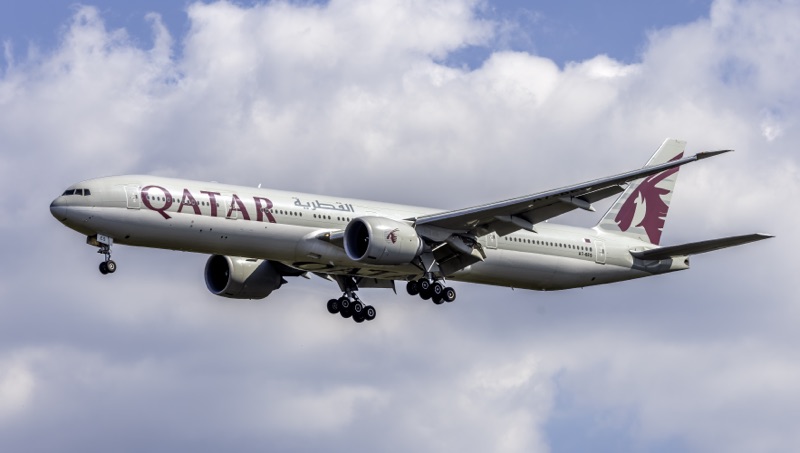
Wikimedia CommonsCC BY-SA 4.0
Airliner1990s
AIRCRAFT BRIEF
The Boeing 777-300ER (Extended Range) is the best-selling variant of the 777 family, combining the stretched fuselage of the -300 with raked wingtips and the powerful GE90-115B engines - the world's most powerful commercial jet engines at 115,300 lbf each. First entering service with Air France in 2004, it displaced four-engine aircraft on ultra-long-haul routes and became the backbone of many major international carriers. PMDG Simulations' 777-300ER for MSFS 2024 is a study-level recreation featuring a fully functional Boeing FMC, EICAS, and authentic GE90 engine start procedures.
RANGE VISUALIZER
SPECIFICATIONS
manufacturerBoeing (PMDG Simulations)
first Flight1994
roleWide-body long-range airliner
crew2 pilots + cabin crew
engines2x GE GE90-115B (115,300 lbf each)
max Speed916 km/h (Mach 0.84)
range13,650 km (7,370 nmi)
ceiling43,100 ft
weight351,534 kg (MTOW)
PHS 1 — Pre-Flight Planning8 steps
| 01 | Weather Briefing (METAR / TAF / Sigmet)NOTE: Check departure, enroute, destination, and alternate weather. Note winds aloft, SIGMET areas, and icing levels. | REVIEWED | |
| 02 | NOTAMsNOTE: Check for runway closures, navigation aid outages, and airspace restrictions at origin and destination. | REVIEWED | |
| 03 | OFP / SimBrief Flight PlanNOTE: Generate and review Operational Flight Plan - route, fuel, winds aloft, step climbs, alternates. | LOADED | |
| 04 | Fuel PlanningNOTE: Block fuel: taxi + trip + contingency (5%) + alternate + final reserve (30 min) + extra. 777-300ER burns ~17,300 lb/hr at cruise. | VERIFIED | |
| 05 | Weight and Balance / LoadsheetCAUTION: Verify ZFW, TOW, and LW within limits. Check CG% MAC is within envelope. MTOW is 351,534 kg. | WITHIN LIMITS | |
| 06 | SID / STAR / Approach ReviewNOTE: Review SID, expected routing, alternate STARs, and instrument approaches at destination. | BRIEFED | |
| 07 | MEL / CDL ItemsNOTE: Review any Minimum Equipment List or Configuration Deviation List items affecting dispatch. | CHECKED | |
| 08 | Performance - Takeoff SpeedsNOTE: V1, VR, V2, assumed temperature (if derated), flap setting, and trim from Boeing ACARS or performance charts. | CALCULATED |
PHS 2 — Electrical Power Up8 steps
| 01 | Battery SwitchNOTE: Overhead electrical panel - raises guard and turns on battery. | ON | |
| 02 | Standby Power Switch | AUTO | |
| 03 | External Power (GPU)NOTE: Confirm GPU AVAIL light, then press to connect. Saves APU fuel during preflight. | CONNECT if available | |
| 04 | Bus Tie Switches (L and R) | AUTO | |
| 05 | APU SwitchNOTE: Hold switch to START until it springs back to ON. Wait for APU RUNNING on EICAS and AVAIL light. | START (hold to ON) | |
| 06 | APU Generator Bus Switches (L and R)NOTE: Wait for EICAS APU messages to clear. | ON | |
| 07 | External PowerNOTE: Remove GPU once APU generators are supplying power. | DISCONNECT | |
| 08 | GSX - Ground Power Unit (GPU)NOTE: GSX menu (Ctrl+F12): Ground Power Unit > Connect. Provides external AC power while engines are off. | CONNECT |
PHS 3 — IRS Alignment4 steps
| 01 | IRS Left SwitchCAUTION: Do not move the aircraft during IRS alignment. Full alignment takes approximately 10 minutes. | NAV | |
| 02 | IRS Right Switch | NAV | |
| 03 | IRS Centre Switch | NAV | |
| 04 | IRS AlignmentNOTE: All three ALIGN lights must extinguish before IRS is usable. Position is set via FMC POS INIT. | MONITOR - wait for ALIGN lights to extinguish |
PHS 4 — Cockpit Preparation24 steps
| 01 | Hydraulic Demand Pumps (L, C, R) | AUTO | |
| 02 | Hydraulic Engine Pumps (1, 2) | NORMAL | |
| 03 | Fuel Pumps - Main Tanks (L FWD, L AFT, R FWD, R AFT) | ON | |
| 04 | Fuel Pumps - Centre Tank (L, R)CAUTION: Centre tank pumps should only run when centre tank has fuel above minimum. | ON (if fuel loaded in centre tank) | |
| 05 | Fuel Cross-Feed Valve | CLOSED | |
| 06 | Window Heat Switches (All Four) | ON | |
| 07 | Probe Heat (All) | OFF (until after engine start) | |
| 08 | Navigation Lights | ON | |
| 09 | Logo Light | AS REQUIRED | |
| 10 | Seatbelt / No Smoking Signs | ON / AUTO | |
| 11 | Air Conditioning Packs (L and R) | AUTO | |
| 12 | Trim Air | ON | |
| 13 | Recirculation Fans (L and R) | AUTO | |
| 14 | Pressurisation Mode | AUTO | |
| 15 | Isolation Valve | AUTO | |
| 16 | Engine Bleed (1 and 2) | ON | |
| 17 | APU BleedNOTE: Turn APU bleed ON now to supply air conditioning and pneumatics during preflight. | ON | |
| 18 | EICAS Primary DisplayNOTE: Check for any EICAS cautions or advisories. Clear any non-essential messages. | VERIFY - No warnings | |
| 19 | Displays (PFD, ND, MFD, EICAS) | ON and SET | |
| 20 | EFIS Control Panels (Capt and F/O) | SET as required | |
| 21 | Altimeters (Both) | SET local QNH | |
| 22 | Standby Instruments | CHECK - attitude, airspeed, altimeter | |
| 23 | Weather RadarCAUTION: Do not operate weather radar toward ground crew. | STBY (do not radiate on ground near personnel) | |
| 24 | TCAS / Transponder Mode | STBY |
PHS 5 — FMC Setup15 steps
| 01 | FMC - POS INIT PageNOTE: Enter gate position coordinates or accept GPS position. IRS alignment uses this reference. | VERIFY position via GPS or enter coordinates | |
| 02 | FMC - ROUTE PageNOTE: Enter ICAO codes for departure and arrival airports and load SimBrief route. | ENTER origin, destination, and flight number | |
| 03 | FMC - Route ActivationNOTE: Press ACTIVATE then EXECUTE to confirm route entry. | ACTIVATE and EXECUTE | |
| 04 | FMC - DEPARTURES PageNOTE: Select active runway and assigned SID. EXEC to confirm. | SELECT runway and SID | |
| 05 | FMC - Waypoints / AirwaysNOTE: Enter airways and waypoints per flight plan. Cross-check with OFP. | ENTER and VERIFY | |
| 06 | FMC - PERF INIT PageNOTE: Enter ZFW in thousands (e.g. 245.0), fuel reserves, cost index, and cruise altitude (e.g. FL380). | ENTER performance data | |
| 07 | FMC - N1 LIMIT PageNOTE: Select TOGA or DERATE 1/2 thrust rating. Enter assumed temperature if flex takeoff. | SET derate or assumed temperature | |
| 08 | FMC - TAKEOFF REF PageNOTE: Enter flap setting (5, 15, or 20) and CG%. FMC computes V1, VR, V2. Note stabiliser trim value. | ENTER flap setting, CG%, and VERIFY V-speeds | |
| 09 | FMC - ARRIVALS PageNOTE: Pre-select arrival procedure. Can be updated during flight. | SELECT STAR, transition, and approach | |
| 10 | FMC - Route Verify | CROSS-CHECK against OFP | |
| 11 | MCP - Flight Directors (Both) | ON | |
| 12 | MCP - Autothrottle Arm | ARM | |
| 13 | MCP - Altitude Window | SET initial cleared altitude | |
| 14 | MCP - Heading Window | SET runway heading | |
| 15 | MCP - Speed Window | SET V2 + 10 |
PHS 6 — Before Start12 steps
| 01 | Parking Brake | SET | |
| 02 | Beacon LightNOTE: Signals ground crew that engines will start. Confirm ground crew is clear. | ON | |
| 03 | Fuel Control Switches (1 and 2) | VERIFY CUTOFF | |
| 04 | Pushback / ClearanceNOTE: Request pushback and start clearance from ground control. Confirm push direction. | OBTAINED | |
| 05 | Engine Start Switch Selector | GND | |
| 06 | DoorsCAUTION: Verify all passenger and cargo doors are closed before pushback. | CLOSED and LOCKED | |
| 07 | Brakes | VERIFY SET before pushback | |
| 08 | GSX - Fuel TruckNOTE: GSX menu: Refuel Aircraft. Set desired fuel load before confirming. | REFUEL COMPLETE | |
| 09 | GSX - Catering ServiceNOTE: GSX menu: Call Catering. Forward and aft catering trucks will service the aircraft. | COMPLETE | |
| 10 | GSX - Passenger BoardingNOTE: GSX menu: Board Passengers. Wait for all passengers to board. | COMPLETE | |
| 11 | GSX - All Passenger DoorsCAUTION: Confirm all door indicators show CLOSED before requesting pushback. | CLOSED | |
| 12 | GSX - Pushback RequestNOTE: GSX menu: Request Pushback. Select direction when prompted. | INITIATED |
PHS 7 — Engine Start13 steps
| 01 | Engine 2 Start SwitchNOTE: Right engine started first. Hold GND position - N2 will begin to rise. | GND (rotate and hold) | |
| 02 | Engine 2 - N2 RisingNOTE: Watch EICAS for N2 percentage rising. No ignition yet. | MONITOR - wait for N2 approx 20% | |
| 03 | Engine 2 Fuel Control SwitchCAUTION: Advance fuel control to RUN only after ~20% N2. Earlier risks a hung or hot start. | RUN (at approx 20% N2) | |
| 04 | Engine 2 - EGT RiseWARNING: Hot start if EGT exceeds 750 C or rises rapidly without stabilising. Abort: fuel control to CUTOFF immediately. | MONITOR EGT - must not exceed 750 C | |
| 05 | Engine 2 - Idle Parameters | VERIFY N1 ~20-22%, N2 ~58-62%, oil pressure green | |
| 06 | Engine 1 Start SwitchNOTE: Begin left engine start once right engine is stable. | GND (rotate and hold) | |
| 07 | Engine 1 - N2 Rising | MONITOR - wait for N2 approx 20% | |
| 08 | Engine 1 Fuel Control SwitchCAUTION: Watch EGT - same hot start risk applies. | RUN (at approx 20% N2) | |
| 09 | Engine 1 - Idle ParametersWARNING: Shut down immediately if no oil pressure within 60 seconds of fuel introduction. | VERIFY N1 ~20-22%, N2 ~58-62%, oil pressure green | |
| 10 | Engine Start Selector | OFF (after both engines stable) | |
| 11 | APU BleedNOTE: Turn off APU bleed once engine bleeds are supplying air. | OFF | |
| 12 | APUNOTE: Shut down APU after engine generators are on-line. | OFF | |
| 13 | GSX - Ground Power Unit (GPU)NOTE: GSX menu: Ground Power Unit > Disconnect. Disconnect once AC bus is powered by engines. | DISCONNECT |
PHS 8 — After Start / Taxi15 steps
| 01 | Engine Generators (1 and 2) | VERIFY ON - GEN OFF BUS lights out | |
| 02 | Probe Heat (All) | ON | |
| 03 | Engine Anti-IceNOTE: ON if OAT at or below +10 C with visible moisture or ice. Do not use in heavy rain only. | AS REQUIRED | |
| 04 | Wing Anti-IceNOTE: ON when icing conditions exist. Do not use on ground unless specifically needed. | AS REQUIRED | |
| 05 | Hydraulic Pressure (All Systems) | CHECK green arc | |
| 06 | Flight Controls | CHECK - full travel yoke and rudder, verify surface response | |
| 07 | Stabiliser TrimNOTE: Set green band trim value calculated by FMC on TAKEOFF REF page. | SET per TAKEOFF REF page | |
| 08 | Flap LeverNOTE: Verify flap indication matches takeoff configuration. | SET TAKEOFF position (5, 15, or 20) | |
| 09 | Autobrake | RTO | |
| 10 | Speedbrake Lever | DOWN / RETRACTED | |
| 11 | Taxi Light | ON | |
| 12 | Runway Turnoff Lights | ON | |
| 13 | Parking BrakeNOTE: Check path is clear, obtain taxi clearance from ground before releasing. | RELEASE | |
| 14 | BrakesNOTE: Apply brakes briefly to verify response. | CHECK during first movement | |
| 15 | Instruments | CHECK during taxi - heading, attitude track turns |
PHS 9 — Before Takeoff15 steps
| 01 | Takeoff BriefingNOTE: Review SID, initial altitude, engine failure procedure, rejected takeoff criteria. | COMPLETED | |
| 02 | Flaps | CONFIRM set for takeoff - verify EICAS | |
| 03 | Stabiliser Trim | CONFIRM in green band | |
| 04 | MCP - Altitude | CONFIRM initial cleared altitude set | |
| 05 | MCP - Heading / LNAV | SET as cleared | |
| 06 | FMC - Active Route | CONFIRM LNAV available | |
| 07 | Speedbrake | CONFIRM DOWN | |
| 08 | Autobrake | CONFIRM RTO | |
| 09 | Altimeters (Both) | CONFIRM QNH set and cross-checked | |
| 10 | Transponder | TA/RA - SET squawk code | |
| 11 | Landing Lights | ON | |
| 12 | Strobe Lights | ON | |
| 13 | Recall Button (EICAS) | PRESS - verify no active messages | |
| 14 | Doors | VERIFY all closed on EICAS synoptic | |
| 15 | Cabin Ready | CONFIRMED from cabin crew |
PHS 10 — Takeoff9 steps
| 01 | Line Up on Runway | CENTERLINE | |
| 02 | Thrust LeversNOTE: Press TOGA switches to engage autothrottle for takeoff. Allow engines to spool to target N1. | TOGA or FLEX/DERATE - advance smoothly | |
| 03 | Engine ParametersCAUTION: Abort if significant N1 split (>10%) or any EICAS warning before 80 kts. | CHECK - both engines matched at target N1 | |
| 04 | 80 KnotsNOTE: Crosscheck both ASIs agree. Pilot flying calls '80 knots', PM responds 'checked'. | CALL - check airspeed alive, both ADIs | |
| 05 | V1WARNING: Do not attempt rejected takeoff at or above V1 unless engine fire / structural failure. | HANDS OFF thrust levers - committed to takeoff | |
| 06 | VRNOTE: The 777-300ER is a long aircraft - beware of tail strikes. Smooth rotation is critical. | ROTATE - pitch 8 degrees initially then 15 degrees nose up | |
| 07 | Positive Rate of Climb | CALL and VERIFY on VSI | |
| 08 | Landing GearNOTE: Retract gear on positive rate of climb confirmation. Gear limit speed 270 kts / 0.82 M. | UP | |
| 09 | LNAV / VNAV | ENGAGE after reaching SID altitude or as appropriate |
PHS 11 — After Takeoff / Climb8 steps
| 01 | Landing Gear | CONFIRM UP - three green lights out | |
| 02 | FlapsNOTE: Flap retraction schedule: flaps 20 retract to 15 at F speed, 15 to 5 at S speed, 5 to 0 at clean speed. | RETRACT on schedule per speed tape | |
| 03 | Landing LightsNOTE: Some airlines keep landing lights on until FL100. | OFF above 10,000 ft | |
| 04 | Seatbelt Sign | OFF when turbulence-free above 10,000 ft | |
| 05 | AltimeterNOTE: Transition altitude varies by country - typically 18,000 ft in USA, lower in Europe. | SET STD (29.92 / 1013) above transition altitude | |
| 06 | Climb Thrust | VERIFY CLB detent or managed thrust | |
| 07 | LNAV / VNAV | ENGAGED and tracking | |
| 08 | FMC Fuel PredictionNOTE: Check fuel at top of climb against OFP. | MONITOR - verify fuel burn matches plan |
PHS 12 — Cruise9 steps
| 01 | Cruise Altitude | AT assigned level | |
| 02 | Autothrottle / VNAV | ENGAGED - managed speed Mach 0.84 | |
| 03 | Fuel QuantityNOTE: All main pumps ON, centre tank pumps run until centre tank is empty (auto fuel management). | MONITOR - check crossfeed and balance | |
| 04 | Fuel Crossfeed | CLOSED (normal operations) | |
| 05 | Engine Anti-Ice | AS REQUIRED - monitor OAT and SAT | |
| 06 | Weather Radar | AS REQUIRED - monitor SIGMET areas | |
| 07 | FMC Cruise Performance | MONITOR - step climb check as fuel burns off | |
| 08 | Position Reports / SELCAL | AS REQUIRED on oceanic routes | |
| 09 | TCAS | TA/RA - monitor |
PHS 13 — Descent Preparation9 steps
| 01 | ATIS / D-ATIS DestinationNOTE: Note active runway, QNH, temperature, winds, and any NOTAMs. | OBTAINED | |
| 02 | FMC - Arrival Airport Data | VERIFY STAR, transition, and approach entered | |
| 03 | FMC - Approach PageNOTE: Enter approach frequency. Verify ILS course and glidepath angle. | SELECT ILS or approach type | |
| 04 | FMC - VREF and VAPPNOTE: Vref for landing weight, Vapp = Vref + additive for conditions. | NOTE from APPROACH REF page | |
| 05 | Altimeters (Both) | SET destination QNH (when received) | |
| 06 | Approach BriefingNOTE: Brief approach type, minimums, missed approach procedure, go-around initial altitude. | COMPLETED | |
| 07 | Autobrake | SELECT as required (1, 2, 3, or MAX) | |
| 08 | MCP - Descent Altitude | SET initial descent altitude | |
| 09 | Seatbelt Sign | ON - notify cabin crew |
PHS 14 — Descent6 steps
| 01 | VNAV DescentNOTE: VNAV manages idle thrust descent profile. Monitor constraints on ND. | ENGAGE or use V/S as required | |
| 02 | Speed | MANAGED or 280 kts below FL290, 250 kts below 10,000 ft | |
| 03 | Altimeters | CONFIRM SET to QNH below transition level | |
| 04 | SpeedbrakeNOTE: Up to half speedbrake in level or gentle descent. Monitor buffet. | DEPLOY as needed for descent rate | |
| 05 | Engine Anti-Ice | ON as required through icing layers | |
| 06 | ATC Clearances | COMPLY - descend to assigned levels |
PHS 15 — Approach15 steps
| 01 | ILS / Localiser FrequencyNOTE: Tune ILS on CDU and verify identifier on ND. Set course on MCP if required. | SET and IDENTIFIED | |
| 02 | Airspeed | REDUCE to 250 kts below 10,000 ft | |
| 03 | Flaps 1NOTE: Begin configuration in sequence. Monitor speed tape for flap maneuver speeds. | EXTEND - below 255 kts | |
| 04 | Flaps 5 | EXTEND - on downwind / as appropriate | |
| 05 | Landing Lights | ON | |
| 06 | Flaps 15 / 20 | EXTEND - configure by final approach | |
| 07 | Landing GearCAUTION: Do not extend gear above gear operating speed limit. | DOWN (below 270 kts / Mach 0.82) | |
| 08 | Gear Indication | THREE GREEN - verify down and locked | |
| 09 | Flaps 25 or 30NOTE: Landing flaps 25 for performance, 30 for shortest landing roll. | EXTEND for final configuration | |
| 10 | Approach Speed (Vapp)NOTE: Vref typically 135-145 kts at typical landing weight. Add 5 kts minimum. | VERIFY on PFD - Vref + additive | |
| 11 | Autobrake | CONFIRM selected | |
| 12 | Speedbrake ArmNOTE: ARM speedbrake - will auto-deploy on touchdown. | ARM | |
| 13 | Recall (EICAS) | PRESS - no active warnings | |
| 14 | GPWS / Terrain | ACTIVE | |
| 15 | AutopilotNOTE: Engage second AP for CAT II/III approaches. | DUAL or SINGLE AP for ILS |
PHS 16 — Landing9 steps
| 01 | Glideslope / Localiser | INTERCEPT and track | |
| 02 | Speed | MAINTAIN Vapp to threshold | |
| 03 | At 50 ft Radio AltitudeNOTE: The 777-300ER is a long aircraft. Avoid excessive flare - risk of tail strike. Target touchdown zone. | FLARE - reduce pitch to approx 5-7 degrees nose up | |
| 04 | Thrust LeversNOTE: Autothrottle retards automatically at 27 ft RA. Verify idle. | IDLE at flare | |
| 05 | TouchdownCAUTION: Keep slight back pressure after touchdown to control nose gear lowering rate. | MAIN GEAR first - smooth | |
| 06 | SpeedbrakeWARNING: If speedbrake does not deploy, extend manually immediately. | AUTO-DEPLOY - verify handle extends | |
| 07 | Autobrake | VERIFY applying - deceleration check | |
| 08 | Thrust ReversersNOTE: Both reversers should deploy symmetrically. Stow above 60 kts. | DEPLOY (full reverse until 80 kts) | |
| 09 | Braking | VERIFY deceleration and apply manual as needed |
PHS 17 — After Landing12 steps
| 01 | Thrust Reversers | STOW (above 60 kts, stow by 40 kts) | |
| 02 | Speedbrake | DOWN (retract after clearing runway) | |
| 03 | Autobrake | OFF / DISARM | |
| 04 | Flaps | RETRACT (flaps 0) | |
| 05 | Landing Lights | OFF | |
| 06 | Runway Turnoff Lights | ON | |
| 07 | Strobe Lights | OFF | |
| 08 | Weather Radar | STBY | |
| 09 | Transponder | STBY | |
| 10 | Probe HeatNOTE: After cleared runway and taxiing to gate. | OFF | |
| 11 | Engine Anti-Ice / Wing Anti-Ice | OFF | |
| 12 | Taxi to Gate | AS DIRECTED by ground control |
PHS 18 — Parking / Shutdown23 steps
| 01 | Parking Brake | SET | |
| 02 | GPU / External Power | CONNECT if available | |
| 03 | APUNOTE: Start APU before shutting engines to maintain electrical power. | START (for ground power if no GPU) | |
| 04 | Seatbelt Sign | OFF | |
| 05 | Beacon Light | ON (keep on until engines shutdown) | |
| 06 | Engine 1 Fuel Control Switch | CUTOFF | |
| 07 | Engine 2 Fuel Control Switch | CUTOFF | |
| 08 | Beacon Light | OFF (after both engines shutdown) | |
| 09 | Engine Generators | VERIFY OFF BUS lights as APU/GPU takes over | |
| 10 | Fuel Pumps (All)NOTE: Main tank pumps and centre tank pumps all to OFF. | OFF | |
| 11 | Probe Heat | VERIFY OFF | |
| 12 | Window Heat | OFF | |
| 13 | Air Conditioning Packs | OFF (if ground A/C available) | |
| 14 | APU Bleed | OFF (if ground A/C connected) | |
| 15 | Hydraulic Demand Pumps | OFF | |
| 16 | IRS | OFF (all three) | |
| 17 | Lights - Navigation, Logo | AS REQUIRED | |
| 18 | Transponder | STBY / OFF | |
| 19 | APUNOTE: Let APU cool for 1 minute before shutting off. | OFF (when complete) | |
| 20 | Battery | OFF | |
| 21 | GSX - Ground Power Unit (GPU)NOTE: GSX menu: Ground Power Unit > Connect. Restores external power for turnaround. | CONNECT | |
| 22 | GSX - Jetway / StairsNOTE: GSX menu: Deboard Passengers. Jetway or airstairs will position automatically. | CONNECTED | |
| 23 | GSX - Passenger DeboardingNOTE: Wait for all passengers to deboard before releasing gate. | COMPLETE |